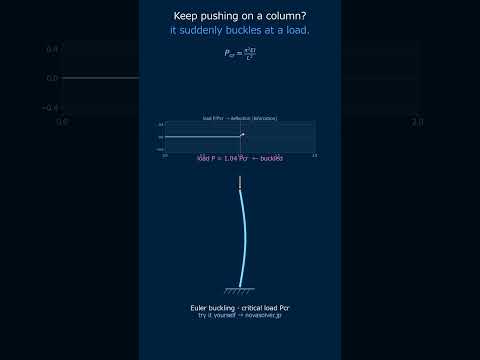
Animate buckling mode shapes for columns with different end conditions. Automatically calculate critical load, slenderness ratio, and effective length.
What exactly is buckling? Is it just the column bending because it's too weak?
🎓
Basically, it's a stability failure, not a strength failure. A perfectly straight column under compression can suddenly snap sideways when the load hits a critical value. It's like pushing down on a ruler until it suddenly bows out. Try changing the "Support Condition" above from "Pin-Pin" to "Fixed-Free" – you'll see the buckling shape and critical load change dramatically.
🙋
Wait, really? So the ends of the column change how it buckles? Why does a fixed-free column look so different?
🎓
In practice, the end conditions define how much the column can rotate or translate at its ends. A fixed end can't rotate, forcing the bend to happen elsewhere. A free end has nothing holding it, so it deflects the most. The simulator shows this: a pin-pin column buckles in a smooth half-sine wave, while a fixed-free column looks like a quarter wave, with all the bending at the top.
🙋
So the "Effective Length" slider is the key? It seems to make a short column act like a longer, weaker one.
🎓
Exactly! That's the core concept. The Effective Length Factor, K, converts the real column length (L) into an equivalent pin-pin column length (K*L) that buckles at the same load. For instance, a fixed-free column (K=2) acts like a pin-pin column that's twice as long. Move the slider to K=2 and watch the critical load drop to one-fourth of its original value – it's very sensitive!
Physical Model & Key Equations
The fundamental equation for elastic (Euler) buckling gives the critical load at which a perfectly straight, homogeneous column becomes unstable. The form depends on the end conditions.
$$P_{cr}= \frac{\pi^2 E I}{(K L)^2}$$
$P_{cr}$ = Critical buckling load (N) $E$ = Modulus of elasticity (Pa) $I$ = Minimum area moment of inertia (m⁴) $L$ = Actual column length between supports (m) $K$ = Effective length factor (dimensionless)
The denominator $(K L)$ is the effective length.
The slenderness ratio determines whether a column will fail by buckling (slender) or by material crushing (stocky). It's the primary design parameter.
$$\lambda = \frac{K L}{r}$$
$\lambda$ = Slenderness ratio $r$ = Radius of gyration, $r = \sqrt{I/A}$ (m) $A$ = Cross-sectional area (m²)
A high $\lambda$ means the column is slender and buckling is the dominant failure mode. Engineers use this to select appropriate columns for different applications.
Frequently Asked Questions
The support conditions change the effective buckling length factor K, which alters the buckling mode shape. For example, pin-pin conditions result in K=1 with a half-sine wave shape, fixed-free conditions give K=2 with a quarter-wavelength shape, and fixed-fixed conditions yield K=0.5 with a shape close to a full wavelength. When you switch conditions on the simulator, the mode shape and buckling load are updated in real time, allowing you to visually confirm the differences.
The larger the slenderness ratio (λ = L_e / i, where i is the radius of gyration), the relatively thinner and longer the column becomes. From Euler's buckling load formula Pcr = π²EI / (KL)², a larger slenderness ratio reduces the critical load, making buckling easier even under small compressive forces. In the simulator, changing the slenderness ratio automatically calculates the buckling load, allowing you to intuitively understand this relationship.
This simulator targets ideal elastic buckling (Euler buckling) and does not consider real phenomena such as material yielding, initial imperfections, or residual stresses. In design, use the obtained buckling load as a reference value and apply safety factors based on national design standards (e.g., steel structure design codes) using allowable stress methods or limit state design methods. This tool is intended solely for understanding phenomena and preliminary studies.
The buckling mode shape is determined by the support conditions (boundary conditions) as an eigenfunction, and while the moment of inertia I affects the magnitude of the buckling load, it does not influence the deformation shape itself. Increasing I raises the buckling load Pcr, but the number of waves or the shape of the deflection curve remains unchanged. In the simulator, when you change I, please confirm that the mode shape stays the same while only the buckling load value is updated.
Real-World Applications
Structural Steel Building Frames: Columns in multi-story buildings are often designed as fixed at the base and partially fixed at the top by the floor beams. Engineers use K-factors between 0.5 and 1.0 to accurately calculate their buckling strength, ensuring the frame can support the weight of floors, occupants, and wind loads.
Spacecraft Launch Vehicle Struts: The thin, high-strength struts inside rocket fuel tanks experience massive axial compression during launch. They are often modeled as pin-pin (K=1) and must be designed with a high slenderness ratio to be lightweight while avoiding buckling under dynamic loads.
Industrial Machinery Pushrods: In hydraulic presses or engine valve trains, pushrods are columns under compression. One end may be fixed by a bearing, and the other may be partially free to rotate, resembling a fixed-pinned condition (K=0.7). Accurate buckling analysis prevents sudden, catastrophic failure during operation.
Scaffolding and Shoring Towers: Temporary construction supports are essentially assemblies of long, pin-ended columns. Their effective length is their full bay height (K=1), and buckling is the primary safety concern. Overloading these can lead to progressive collapse, making Euler buckling calculations vital for on-site safety.
Common Misconceptions and Points to Note
When you start using this simulator, especially as you get closer to practical applications, there are several points you should be aware of. A major misconception is thinking that "once you find the buckling load, you're safe". In actual design, what Euler buckling provides is the theoretical value for a "perfectly straight, ideal column". Real columns always have initial deflection, residual stress, and load eccentricity. Therefore, you must apply a large factor of safety or move to the more realistic concept of "inelastic buckling". For example, for columns with a small slenderness ratio (thick and short columns), material yielding occurs before buckling, so the Euler formula is not applicable in the first place.
Next, there's the assumption that "support conditions are determined exactly as in the model". While you can select "fixed" or "pinned" with a click in the simulator, field connections are almost always somewhere in between. For instance, a bolted steel column base is considered "semi-rigid", not perfectly fixed. If you casually assume it's "fixed", you might overestimate its strength compared to reality, leading to a potentially dangerous design. The basic approach is to first evaluate under the "most unfavorable condition (usually pinned-pinned)" and incorporate a margin.
Finally, be careful with the handling of the moment of inertia \(I\). Buckling occurs around the weak axis. For example, in an H-shaped steel section, the value of \(I\) can differ by several times between the strong axis (x-axis) and the weak axis (y-axis). When you "can change the cross-section" in the simulator, be conscious about which axis you're considering for buckling. The principle is to use the minimum moment of inertia \(I_{min}\) around the weak axis for your calculations.
Enter Young's modulus (E) in GPa—typically 200 GPa for steel, 69 GPa for aluminum, 12 GPa for timber.
Input second moment of inertia (I) in mm⁴ and cross-sectional area (A) in mm² from your section properties table.
Set column length (L) in meters and select end conditions (pinned-pinned, fixed-free, fixed-fixed, or fixed-pinned) to determine effective length factor K.
Click Calculate to display critical buckling load (Pcr), slenderness ratio (L/r), and animated mode shape deformation.
Worked Example
Steel tubular column: E=200 GPa, I=8.5×10⁶ mm⁴, A=2500 mm², L=4.8 m, pinned-pinned ends (K=1.0). Slenderness ratio λ=96. Critical load Pcr=(π²×200×10³×8.5×10⁶)/(4.8×1000)²=734 kN. Visualization shows first mode shape with maximum mid-span deflection at 0.5L. Increasing length to 6 m reduces Pcr to 463 kN; changing to fixed-free (K=2.0) further reduces it to 116 kN, demonstrating sensitivity to boundary conditions.
Practical Notes
For compression members in steel frames, verify actual end-restraint conditions—assumed fixed connections often exhibit semi-rigid behavior, requiring K=1.2–1.5 in Euler calculations.
Slenderness limit λ<200 applies to primary members; secondary bracing elements tolerate λ up to 300 in many codes.
Animate successive buckling modes (first, second, third) to assess column capacity and design adequacy before failure.
Account for initial curvature and residual stress; real columns fail at 70–90% of theoretical Pcr depending on imperfection sensitivity.
🎬 Watch it in motion
Euler Buckling | a slender column snaps sideways at once #Shorts
Why does a column suddenly snap? Euler buckling #Shorts