Freely configure two sinusoidal waves to animate interference and superposition in real time. Visually experience constructive interference, destructive interference, beats, and standing waves.
Source & Wave Settings
Presets
2.0 m
1.0 m
0 °
8.0 m
Tip: Increasing source spacing d produces finer fringes (smaller Δy), while increasing wavelength λ produces coarser fringes (larger Δy). Setting the phase difference Δφ to 180° turns the center into a dark fringe (destructive interference).
Live Readouts
1.00
Wavelength λ
2.00
Source Spacing d
0°
Phase Difference Δφ
—
Fringe Spacing Δy [m]
—
First Maximum Angle θ₁
2D Interference Field (Superposed Amplitude)
Crests (red) and troughs (blue)Bright fringes (Constructive)Dark fringes (Destructive)Source
Dark fringes (Destructive): Path difference = (n+½)λ ($r_2-r_1=(n+\tfrac12)\lambda$)
Far-field approximation: d·sinθ = nλ; fringe spacing on the screen Δy ≈ λL/d
Resolution is limited to maintain 60 fps.
What is Wave Interference & Superposition?
🙋
What exactly is "superposition"? It sounds complicated, but the simulator just shows two waves adding together.
🎓
Basically, it's exactly that! The superposition principle states that when two or more waves meet, the resulting displacement is simply the sum of their individual displacements. In this simulator, the blue and red waves add up to create the green wave. Try setting both amplitudes to 1 and frequencies to the same value—you'll see a simple, bigger wave.
🙋
Wait, really? So that's what causes those crazy patterns sometimes? What happens if I make the frequencies slightly different?
🎓
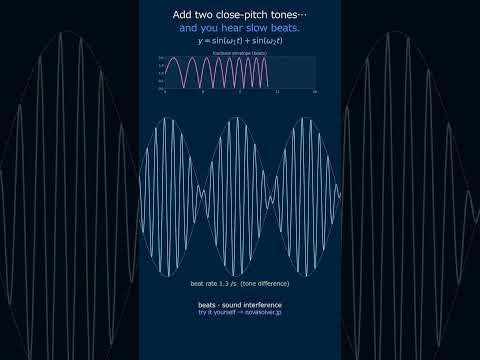
Great question! That's how you create "beats." If you set, for instance, f₁=1.0 Hz and f₂=1.1 Hz in the controls, you'll hear (and see) a pulsating effect in the green wave. The beat frequency is just the absolute difference, |f₁ - f₂| = 0.1 Hz. The simulator animates this in real-time, showing how the waves periodically reinforce and cancel each other.
🙋
Okay, I see the beats! But what about "standing waves"? The FAQ mentions them. How do I make one with this tool?
🎓
A standing wave is a special interference pattern. To simulate it, set the two waves to have the same frequency and amplitude, but make them travel in opposite directions. In our simulator, both waves move right by default. To create the opposite direction, you can cleverly use the phase shift (φ). Try setting A₁=A₂=1, f₁=f₂=1, but set φ₂ to 180°. Watch the green wave—it will oscillate in place with fixed nodes and antinodes, which is the hallmark of a standing wave.
Physical Model & Key Equations
The simulator models two traveling sinusoidal waves. Each wave is defined by its amplitude, frequency, phase, and the wave speed, which together determine its shape at any point in space (x) and time (t).
$$y_1 = A_1\sin(k_1 x - \omega_1 t + \phi_1), \quad y_2 = A_2\sin(k_2 x - \omega_2 t + \phi_2)$$
Here, $A$ is the amplitude (wave height), $\phi$ is the phase shift (starting angle), and $\omega = 2\pi f$ is the angular frequency. The wavenumber $k = \frac{2\pi f}{v}$ links frequency and wave speed $v$, determining how squeezed or stretched the wave is in space.
The core principle visualized is linear superposition. The total wave at any point is the algebraic sum of the two individual waves.
$$y_{total}(x, t) = y_1(x, t) + y_2(x, t)$$
This simple addition leads to all complex phenomena: constructive interference (peaks align, $y_{total}$ is larger), destructive interference (a peak meets a trough, $y_{total}$ is smaller), beats (from slightly different frequencies), and standing waves (from waves traveling in opposite directions).
Real-World Applications
Active Noise Cancellation (ANC) Headphones: This technology relies on destructive interference. A microphone picks up ambient noise (e.g., engine hum), and the headphone generates a sound wave of the same amplitude but opposite phase (180° shift). The two waves superpose and cancel each other out at your ear, creating silence. Engineers use simulations like this to design the phase and amplitude matching.
Ultrasonic Testing & Phased Array Sensors: In non-destructive testing, arrays of ultrasonic transducers send waves into materials. By carefully controlling the phase ($\phi$) and timing of each transducer's pulse, engineers can "steer" and focus the resulting superimposed wavefront to detect cracks or flaws inside structures like pipelines or aircraft wings.
Structural Vibration & Resonance Avoidance: In CAE for buildings or car frames, engineers must analyze how vibrational waves from different sources (engines, wind) will interfere. Destructive interference is good, but constructive interference at a structure's natural frequency causes dangerous resonance. Superposition simulations help predict and redesign to avoid these conditions.
Acoustic Room Design (FEM Applications): When designing concert halls or recording studios, engineers use Finite Element Method (FEM) software. These tools solve the superposition of countless sound waves reflecting off walls to model "dead spots" (destructive interference) and "hot spots" (constructive interference), ensuring even sound distribution.
Common Misunderstandings and Points to Note
First, note that "interference" and "superposition" are not exactly the same. Superposition is simply the principle of adding waves together, while interference refers to the phenomenon where a stationary "pattern of reinforcement and cancellation (interference fringes)" is observed as a result. For example, if you superimpose two waves with significantly different frequencies, you won't see a stable interference fringe pattern over time.
Next, here are some tips for parameter settings when observing beats with the simulator. If the beat frequency $f_{\text{beat}}= |f_1 - f_2|$ is too high, the amplitude fluctuation will be too fast to follow visually. Conversely, if it's too low, the change is slow and observation takes time. For instance, setting f₁=100Hz and f₂=103Hz yields an easily observable 3Hz beat, which sounds like a "wobble... wobble..." effect. A difference of 10Hz or more tends to sound more like dissonance rather than a distinct beat.
Also, don't get confused by the "phase" setting. The phase angle φ is the offset of the wave's starting point. If you shift the phase of only one wave by 180° (π radians) in the simulator, they indeed cancel each other out at a point, but this does not happen simultaneously everywhere. In a wave spreading through space, even if a peak and a trough overlap at one point, a peak and a peak might overlap at another. Remember that complete cancellation only occurs in the special case where the wave shapes (amplitude, waveform, frequency) are perfectly identical and the phases are offset by exactly 180°.
Set Wave 1 amplitude (a1Val) in volts and frequency (f1Val) in Hz; enter phase offset (phi1Val) in degrees
Configure Wave 2 amplitude (a2Val) and frequency (f1) independently to create interference patterns
Click animate to visualize superposition; monitor Beat Frequency output when frequencies differ by 1–5 Hz for acoustic beat demonstrations
Worked Example
Two ultrasonic transducers emit at f1=40 kHz, a1=2V and f2=40.5 kHz, a2=2V with phi1=0°. Simulator computes Beat Frequency=0.5 Hz, Max Composite Amplitude=4V (constructive), λ₁=8.6 mm, λ₂=8.4 mm. The 0.5 Hz beat envelope modulates the 40.25 kHz carrier visible in real-time animation, critical for sonar overlap detection.
Practical Notes
Set frequencies within 2% (e.g., 100 Hz and 102 Hz) to observe standing wave nodes in enclosed resonance chambers; destructive interference nulls appear stationary
Phase shift phi1 by 180° to toggle between constructive (amplitude 4V) and destructive (amplitude 0V) interference at identical frequencies
Monitor Max Composite Amplitude exceeding input sum—indicates nonlinear coupling; keep both waves ≤3V for linear superposition validity
🎬 Watch it in motion
Beats | two close tones make the volume pulse #Shorts